自從上一篇:后,很巧的是這次又發現一個問題,所以有了這篇文章,還是想沿用上篇的”流水帳“的方式查找問題和解決問題。這篇文章主要是因為使用POI導入一個20M的excel發生了OOM(OutOfMemoryError)異常。說來也慚愧,工作了這麼多年,還真沒導入過這種大小的文件,並且還發生了內存溢出。如果你百度下基本上清一色的告訴你:POI導入excel文件有兩種方式,第一種是用戶模式,這種模式用起來很簡單直觀,可以類比xml的dom方式解析(這裏只針對excel2007,因為2003本身就有最大條數限制並且目前基本用的很少,這裏直接忽略),第二種是event模式,這種通常是網上說的解決POI導入大excel的”萬金油“方法,可以類比為xml的sax解析方式。呵呵,我這篇文章首先就是要干趴這種方法(JVM使用-Xms512m -Xmx512m)。不信你隨便寫一個導入接口,導入如下20M大小的execl看看:鏈接: https://pan.baidu.com/s/1DUrS8ctLPp7Z6imOc1aIUQ 提取碼: hd79 。
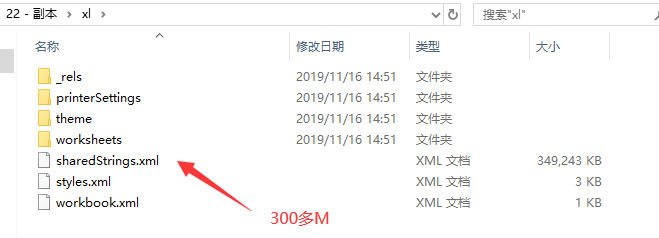
首先,既然要導入大點的excel2007,那麼我們應該稍微了解一下這種文件如何存儲數據,我們百度上可以發現,2007其實就是一個壓縮包,可以直接修改後綴成zip然後解壓打開文件看看,如下
上圖可以看到最大的兩個文件就兩個:sharedStrings.xml和sheet1.xml。其中sheet2.xml這個可以不關注,直接從excel刪掉都沒事,這裏沒刪除主要是沒多大關係,這個excel文件也是測試直接提供給我的。由於sheet2比較小,與這個文章說到的內存溢出並無關係,請不要胡思亂想,被分散了注意。
直接用大文本編輯工具打開上圖兩個大文件,可以發現sharedString.xml里內容其實就是excel中每個單元格里的字符串內容(数字類型除外),sheet.xml就是每個sheet里的結構xml,了解到這裏基本上就了解了本文章說到問題的基本知識,然後下面進入正題。
先使用百度中查到的提供的event方式導入excel,代碼如下:
package com.example.utils;

import org.apache.poi.openxml4j.opc.OPCPackage;
import org.apache.poi.xssf.eventusermodel.ReadOnlySharedStringsTable;
import org.apache.poi.xssf.eventusermodel.XSSFReader;
import org.apache.poi.xssf.usermodel.XSSFRichTextString;
import org.xml.sax.Attributes;
import org.xml.sax.InputSource;
import org.xml.sax.SAXException;
import org.xml.sax.XMLReader;
import org.xml.sax.helpers.DefaultHandler;
import org.xml.sax.helpers.XMLReaderFactory;

import java.io.File;
import java.io.InputStream;
import java.sql.SQLException;
import java.util.ArrayList;
import java.util.Iterator;
import java.util.List;

/**
 * 百度上直接copy過來的
 * XSSF and SAX (Event API)
 */
public abstract class BigDataParseExcelUtil extends DefaultHandler {
    private ReadOnlySharedStringsTable sst;
    private String lastContents;
    private boolean nextIsString;
    private int sheetIndex = -1;
    private List<String> rowlist = new ArrayList<String>();
    private int curRow = 0; // 當前行
    private int curCol = 0; // 當前列索引
    private int preCol = 0; // 上一列列索引
    private int titleRow = 0; // 標題行,一般情況下為0
    private int rowsize = 0; // 列數
    private List excelList = new ArrayList();  //excel全部轉換為list

    // excel記錄行操作方法,以sheet索引,行索引和行元素列表為參數,對sheet的一行元素進行操作,元素為String類型

    public abstract void optRows(int sheetIndex, int curRow,
                                 List<String> rowlist, List excelList) throws SQLException, Exception;

    // 只遍歷一個sheet,其中sheetId為要遍歷的sheet索引,從1開始,1-3

    /**
     * @param filename
     * @param sheetId  sheetId為要遍歷的sheet索引,從1開始,1-3
     * @throws Exception
     */
    public void processOneSheet(String filename, int sheetId) throws Exception {
        OPCPackage pkg = OPCPackage.open(filename);
        XSSFReader r = new XSSFReader(pkg);
        ReadOnlySharedStringsTable strings = new ReadOnlySharedStringsTable(pkg);
        XMLReader parser = fetchSheetParser(strings);
        // rId2 found by processing the Workbook
        // 根據 rId# 或 rSheet# 查找sheet
        InputStream sheet2 = r.getSheet("rId" + sheetId);
        sheetIndex++;
        InputSource sheetSource = new InputSource(sheet2);
        parser.parse(sheetSource);
        sheet2.close();
    }

    @Override
    public void characters(char[] ch, int start, int length)
        throws SAXException {
        // 得到單元格內容的值
        lastContents += new String(ch, start, length);
    }

    public void process(InputStream inputStream) throws Exception {
        OPCPackage pkg = OPCPackage.open(inputStream);
        XSSFReader r = new XSSFReader(pkg);
        ReadOnlySharedStringsTable strings = new ReadOnlySharedStringsTable(pkg);
        XMLReader parser = fetchSheetParser(strings);
        Iterator<InputStream> sheets = r.getSheetsData();
        while (sheets.hasNext()) {
            curRow = 0;
            sheetIndex++;
            InputStream sheet = sheets.next();
            InputSource sheetSource = new InputSource(sheet);
            parser.parse(sheetSource);
            sheet.close();
        }
    }

    /**
     * 遍歷 excel 文件
     */
    public void process(File file) throws Exception {
        OPCPackage pkg = OPCPackage.open(file);
        XSSFReader r = new XSSFReader(pkg);
        ReadOnlySharedStringsTable strings = new ReadOnlySharedStringsTable(pkg);
        XMLReader parser = fetchSheetParser(strings);
        Iterator<InputStream> sheets = r.getSheetsData();
        while (sheets.hasNext()) {
            curRow = 0;
            sheetIndex++;
            InputStream sheet = sheets.next();
            InputSource sheetSource = new InputSource(sheet);
            parser.parse(sheetSource);
            sheet.close();
        }
    }

    public XMLReader fetchSheetParser(ReadOnlySharedStringsTable sst)
        throws SAXException {
        XMLReader parser = XMLReaderFactory.createXMLReader();
        // .createXMLReader("org.apache.xerces.parsers.SAXParser");
        this.sst = sst;
        parser.setContentHandler(this);
        return parser;
    }

    @Override
    public void startElement(String uri, String localName, String name,
                             Attributes attributes) throws SAXException {
        // c => 單元格
        if (name.equals("c")) {
            // 如果下一個元素是 SST 的索引,則將nextIsString標記為true
            String cellType = attributes.getValue("t");
            String rowStr = attributes.getValue("r");
            curCol = this.getRowIndex(rowStr);
            if (cellType != null && cellType.equals("s")) {
                nextIsString = true;
            } else {
                nextIsString = false;
            }
        }
        // 置空
        lastContents = "";
    }

    @Override
    public void endElement(String uri, String localName, String name)
        throws SAXException {
        // 根據SST的索引值的到單元格的真正要存儲的字符串
        // 這時characters()方法可能會被調用多次
        if (nextIsString) {
            try {
                int idx = Integer.parseInt(lastContents);
                lastContents = new XSSFRichTextString(sst.getEntryAt(idx))
                    .toString();
            } catch (Exception e) {
            }
        }
        // v => 單元格的值,如果單元格是字符串則v標籤的值為該字符串在SST中的索引
        // 將單元格內容加入rowlist中,在這之前先去掉字符串前後的空白符
        if (name.equals("v")) {
            String value = lastContents.trim();
            value = value.equals("") ? " " : value;
            int cols = curCol - preCol;
            if (cols > 1) {
                for (int i = 0; i < cols - 1; i++) {
                    rowlist.add(preCol, "");
                }
            }
            preCol = curCol;
            rowlist.add(curCol - 1, value);
        } else {
            // 如果標籤名稱為 row ,這說明已到行尾,調用 optRows() 方法
            if (name.equals("row")) {
                int tmpCols = rowlist.size();
                if (curRow > this.titleRow && tmpCols < this.rowsize) {
                    for (int i = 0; i < this.rowsize - tmpCols; i++) {
                        rowlist.add(rowlist.size(), "");
                    }
                }
                try {
                    optRows(sheetIndex, curRow, rowlist, excelList);
                } catch (SQLException e) {
                    e.printStackTrace();
                } catch (Exception e) {
                    // TODO Auto-generated catch block
                    e.printStackTrace();
                }
                if (curRow == this.titleRow) {
                    this.rowsize = rowlist.size();
                }
                rowlist.clear();
                curRow++;
                curCol = 0;
                preCol = 0;
            }
        }
    }

    // 得到列索引,每一列c元素的r屬性構成為字母加数字的形式,字母組合為列索引,数字組合為行索引,
    // 如AB45,表示為第(A-A+1)*26+(B-A+1)*26列,45行
    public int getRowIndex(String rowStr) {
        rowStr = rowStr.replaceAll("[^A-Z]", "");
        byte[] rowAbc = rowStr.getBytes();
        int len = rowAbc.length;
        float num = 0;
        for (int i = 0; i < len; i++) {
            num += (rowAbc[i] - 'A' + 1) * Math.pow(26, len - i - 1);
        }
        return (int) num;
    }


}
package com.example.service;

import com.example.utils.BigDataParseExcelUtil;
import org.springframework.stereotype.Service;

import java.io.InputStream;
import java.sql.SQLException;
import java.util.List;

/**
 * @author: rongdi
 * @date:
 */
@Service
public class ExcelService {

    public void import1(InputStream inputStream) throws Exception {

        BigDataParseExcelUtil xlx = new BigDataParseExcelUtil() {
            @Override
            public void optRows(int sheetIndex, int curRow, List<String> rowlist, List excelList)
                throws SQLException {
                System.out.println(rowlist);
            }
        };
        xlx.process(inputStream);
    }


}
package com.example.controller;

import com.example.service.ExcelService;
import org.springframework.beans.factory.annotation.Autowired;
import org.springframework.stereotype.Controller;
import org.springframework.web.bind.annotation.RequestMapping;
import org.springframework.web.bind.annotation.RequestParam;
import org.springframework.web.bind.annotation.ResponseBody;
import org.springframework.web.multipart.MultipartFile;

/**
 * @author: rongdi
 * @date:
 */
@Controller
public class ExcelController {

    @Autowired
    private ExcelService excelService;

    @RequestMapping("/excel/import1")
    @ResponseBody
    public String import1(@RequestParam("file") MultipartFile multipartFile) throws Exception {
        excelService.import1(multipartFile.getInputStream());
        return "ok";
    }

}
使用postman等工具,導入上面說的20M的文件,報錯如下:
那我們優化一下不使用inputStream,直接使用一個File傳入看看
    public void import2(File file) throws Exception {
        BigDataParseExcelUtil xlx = new BigDataParseExcelUtil() {
            @Override
            public void optRows(int sheetIndex, int curRow, List<String> rowlist, List excelList)
                throws SQLException {
                System.out.println(rowlist);
            }
        };
        xlx.process(file);
    }

    @RequestMapping("/excel/import2")
    @ResponseBody
    public String import2(@RequestParam("file") MultipartFile multipartFile) throws Exception {
        // 延遲解析比率
        ZipSecureFile.setMinInflateRatio(-1.0d);
        File tmp = Files.createTempFile("tmp-", ".xlsx").toFile();
        Files.copy(multipartFile.getInputStream(), Paths.get(tmp.getPath()), StandardCopyOption.REPLACE_EXISTING);
        excelService.import2(tmp);
        return "ok";
    }
使用postman上傳文件運行效果如下:
這時候就發現很尷尬了,難道是POI自己代碼里就有bug,我們可以使用斷點調試確認一下這個strings里到底是不是全部放了sharedStrings.xml里的內容。
由上證明就是這個strings裝多了導致內存溢出了,從這裏可以看出網上說使用event事件解析excel的方案基本都是行不通的,哎,我也不懂為啥百度上都是這種答案,難道他們壓根都沒遇到過大數據導入嗎?當然也有可能我冤枉了他們,因為sharedStrings.xml中存放的是每個單元格的字符串內容,這個存放是排重過的,如果雖然excel里單元格很多,但是大多都是整型或者大多都是重複的,那確實可以跳過這一步一路之後會一路暢通了,因為畢竟sax解析xml確實可以節省很多內存。
從上分析可以看到POI就兩種方式導入:一種是用戶方式寫代碼簡單,基本按順序數格子就好,但是類比dom方式解析xml,很耗內存。第二種事件方式,類比sax方式解析xml確實很省內存,但是POI提供的類里把解析出的大量字符串放入了集合中,還是會導致內存溢出。那麼我們怎麼解決這個問題,這裏很常規的想法是到底這個strings是用來幹啥的,怎麼用的,如果可以保持strings相同邏輯功能的前提下,修改了ReadOnlySharedStringsTable這個類的邏輯,就可以解決這裏的內存溢出了。那麼我們可以直接搜索ReadOnlySharedStringsTable類里所有用到strings的方法上打上斷點,特別是從strings里取值的方法上,然後調大jvm內存避免內存溢出的情況下斷點調試如下
我們是不是可以直接往strings里添加字符串和獲取字符串的方法那裡替換掉,不要使用strings這個集合存儲所有字符串。但是既然excel里設計成使用一個sharedStrings.xml存放公共的字符串,而不是像csv格式那樣,每次讀一行取一行數據就好了。那麼這個sharedStrings.xml中的數據總要解析出來,總要有個地方存儲裏面的數據,不然怎麼結合sheet.xml的格式獲取到每一行的數據呢?所以這裏就很尷尬了,不能每次解析sharedStrings.xml時不保存每次需要獲取strings的時候,再去解析一下這個xm吧,如果從本文章的xml上來看,要重複解析25W次,效率極其低。現在問題可以簡化成我們需要把sharedStrings.xml解析出的所有字符串放在一個地方,還能方便解析,由於怕內存溢出,肯定不能放在內存中了。那麼這裏就有一些選擇,比如解析出的字符串按加入strings集合的順序放入數據庫,文件,外部存儲或者緩存(限制內存大小,多餘寫入文件)存儲中。然後使用的時候按照索引位置idx去一一取出。本文章先使用臨時文件來放這些數據,因為不想搞那麼複雜,導入任務不管再多複雜的系統中,最終執行的都會是一個單節點,在單節點中先使用本機資源這種就近資源是最方便的。如下直接先複製源碼,然後修改上述說的兩個地方。
package com.example.utils;

import org.apache.poi.ooxml.util.SAXHelper;
import org.apache.poi.openxml4j.opc.OPCPackage;
import org.apache.poi.openxml4j.opc.PackagePart;
import org.apache.poi.ss.usermodel.RichTextString;
import org.apache.poi.util.Removal;
import org.apache.poi.xssf.model.SharedStrings;
import org.apache.poi.xssf.usermodel.XSSFRelation;
import org.apache.poi.xssf.usermodel.XSSFRichTextString;
import org.xml.sax.Attributes;
import org.xml.sax.InputSource;
import org.xml.sax.SAXException;
import org.xml.sax.XMLReader;
import org.xml.sax.helpers.DefaultHandler;

import javax.xml.parsers.ParserConfigurationException;
import java.io.File;
import java.io.FileNotFoundException;
import java.io.FileOutputStream;
import java.io.FileReader;
import java.io.IOException;
import java.io.InputStream;
import java.io.LineNumberReader;
import java.io.PushbackInputStream;
import java.nio.file.Files;
import java.util.ArrayList;
import java.util.LinkedHashMap;
import java.util.List;
import java.util.Map;

import static org.apache.poi.xssf.usermodel.XSSFRelation.NS_SPREADSHEETML;

public class ReadOnlySharedStringsTable extends DefaultHandler implements SharedStrings {

    protected final boolean includePhoneticRuns;

    /**
     * An integer representing the total count of strings in the workbook. This count does not
     * include any numbers, it counts only the total of text strings in the workbook.
     */
    protected int count;

    /**
     * An integer representing the total count of unique strings in the Shared String Table.
     * A string is unique even if it is a copy of another string, but has different formatting applied
     * at the character level.
     */
    protected int uniqueCount;

    /**
     * The shared strings table.
     */
    private List<String> strings;

    private File tmp = null;

    FileOutputStream fos = null;

    private int counts;

    private Map<Integer,String> map = new LinkedHashMap<Integer,String>();

    public ReadOnlySharedStringsTable(OPCPackage pkg)
            throws IOException, SAXException {
        this(pkg, true);
    }

    public ReadOnlySharedStringsTable(OPCPackage pkg, boolean includePhoneticRuns)
            throws IOException, SAXException {
        this.includePhoneticRuns = includePhoneticRuns;
        ArrayList<PackagePart> parts =
                pkg.getPartsByContentType(XSSFRelation.SHARED_STRINGS.getContentType());

        // Some workbooks have no shared strings table.
        if (parts.size() > 0) {
            PackagePart sstPart = parts.get(0);
            readFrom(sstPart.getInputStream());
        }
    }

    /**
     * Like POIXMLDocumentPart constructor
     *
     * Calls {@link #ReadOnlySharedStringsTable(PackagePart, boolean)}, with a
     * value of <code>true</code> to include phonetic runs.
     *
     * @since POI 3.14-Beta1
     */
    public ReadOnlySharedStringsTable(PackagePart part) throws IOException, SAXException {
        this(part, true);
    }

    /**
     * Like POIXMLDocumentPart constructor
     *
     * @since POI 3.14-Beta3
     */
    public ReadOnlySharedStringsTable(PackagePart part, boolean includePhoneticRuns)
        throws IOException, SAXException {
        this.includePhoneticRuns = includePhoneticRuns;
        readFrom(part.getInputStream());
    }

    /**
     * Read this shared strings table from an XML file.
     *
     * @param is The input stream containing the XML document.
     * @throws IOException if an error occurs while reading.
     * @throws SAXException if parsing the XML data fails.
     */
    public void readFrom(InputStream is) throws IOException, SAXException {
        // test if the file is empty, otherwise parse it
        PushbackInputStream pis = new PushbackInputStream(is, 1);
        int emptyTest = pis.read();
        if (emptyTest > -1) {
            pis.unread(emptyTest);
            InputSource sheetSource = new InputSource(pis);
            try {
                XMLReader sheetParser = SAXHelper.newXMLReader();
                sheetParser.setContentHandler(this);
                sheetParser.parse(sheetSource);
            } catch(ParserConfigurationException e) {
                throw new RuntimeException("SAX parser appears to be broken - " + e.getMessage());
            }
        }
    }

    /**
     * Return an integer representing the total count of strings in the workbook. This count does not
     * include any numbers, it counts only the total of text strings in the workbook.
     *
     * @return the total count of strings in the workbook
     */
    @Override
    public int getCount() {
        return this.count;
    }

    /**
     * Returns an integer representing the total count of unique strings in the Shared String Table.
     * A string is unique even if it is a copy of another string, but has different formatting applied
     * at the character level.
     *
     * @return the total count of unique strings in the workbook
     */
    @Override
    public int getUniqueCount() {
        return this.uniqueCount;
    }

    /**
     * Return the string at a given index.
     * Formatting is ignored.
     *
     * @param idx index of item to return.
     * @return the item at the specified position in this Shared String table.
     * @deprecated use <code>getItemAt</code> instead
     */
    @Removal(version = "4.2")
    @Deprecated
    public String getEntryAt(int idx) {
        /**
         * 這裏就是修改部分了,直接從按行存儲的臨時文件讀取需要的字符串
         */
        String value = map.get(idx + 1);
        if(value == null) {

            return readString(idx,1000,this.uniqueCount);
        } else {
            return value;
        }

    }

    /**
     * 從指定位置讀取size個字符串,這裡是使用局部性原理,每次讀取size個字符串,
     * 以免每次需要讀取文件,性能極低
     * @return
     */
    private String readString(int idx,int size,int numbers) {
        map.clear();
        int currNumber = idx + 1;
        if (currNumber < 0 || currNumber > numbers) {
            return null;
        }
        try {
            FileReader in = new FileReader(tmp);
            LineNumberReader reader = new LineNumberReader(in);
            try {
                String line = "";
                for(int i = 1;i <= numbers;i ++) {
                    line = reader.readLine();
                    if(i >= currNumber && i < currNumber + size) {
                        map.put(i, line);
                    }
                }
            } finally {
                reader.close();
                in.close();
            }
        } catch (Exception e) {
            System.out.println(e.getMessage());
        }
        return map.get(idx + 1);
    }


    /**
     * Returns all the strings.
     * Formatting is ignored.
     *
     * @return a list with all the strings
     * @deprecated use <code>getItemAt</code> instead
     */
    @Removal(version = "4.2")
    @Deprecated
    public List<String> getItems() {
        return strings;
    }

    @Override
    public RichTextString getItemAt(int idx) {
        return new XSSFRichTextString(getEntryAt(idx));
    }

    //// ContentHandler methods ////

    private StringBuilder characters;
    private boolean tIsOpen;
    private boolean inRPh;

    @Override
    public void startElement(String uri, String localName, String name,
                             Attributes attributes) throws SAXException {
        if (uri != null && ! uri.equals(NS_SPREADSHEETML)) {
            return;
        }

        if ("sst".equals(localName)) {
            String count = attributes.getValue("count");
            if(count != null) this.count = Integer.parseInt(count);
            String uniqueCount = attributes.getValue("uniqueCount");
            if(uniqueCount != null) this.uniqueCount = Integer.parseInt(uniqueCount);
            try {
                tmp = Files.createTempFile("tmp-", ".xlsx").toFile();
            } catch (IOException e) {
                e.printStackTrace();
            }
            //    this.strings = new ArrayList<>(this.uniqueCount);
            characters = new StringBuilder(64);
            try {
                fos = new FileOutputStream(tmp,true);
            } catch (FileNotFoundException e) {
                e.printStackTrace();
            }
        } else if ("si".equals(localName)) {
            characters.setLength(0);
        } else if ("t".equals(localName)) {
            tIsOpen = true;
        } else if ("rPh".equals(localName)) {
            inRPh = true;
            //append space...this assumes that rPh always comes after regular <t>
            if (includePhoneticRuns && characters.length() > 0) {
                characters.append(" ");
            }
        }
    }

    @Override
    public void endElement(String uri, String localName, String name) throws SAXException {
        if (uri != null && ! uri.equals(NS_SPREADSHEETML)) {
            return;
        }

        if ("si".equals(localName)) {
         //   strings.add(characters.toString().intern());
            try {
                /**
                 * 這裏就是修改的一部分,這裏直接把字符串按行存入臨時文件
                 */
                counts ++;
                fos.write((characters.toString() + "\n").getBytes());
                if(counts == this.uniqueCount) {
                    fos.close();
                }
            } catch (IOException e) {
                e.printStackTrace();
            }
        } else if ("t".equals(localName)) {
            tIsOpen = false;
        } else if ("rPh".equals(localName)) {
            inRPh = false;
        }
    }

    /**
     * Captures characters only if a t(ext) element is open.
     */
    @Override
    public void characters(char[] ch, int start, int length) throws SAXException {
        if (tIsOpen) {
            if (inRPh && includePhoneticRuns) {
                characters.append(ch, start, length);
            } else if (! inRPh){
                characters.append(ch, start, length);
            }
        }
    }

}
然後在自己代碼里把包換成自己的包,替換POI里該類的包,運行JVM堆情況如下毫無壓力
自此內存溢出問題大功告成!針對使用POI導入大Excel遇到的問題總結如下:
1)網上給出的方案不管是用戶模式還是事件模式,往往都不能支持大excel的導入
2)excel本質上是一堆excel的壓縮包(這裏只考慮2007忽略2003)改了個後綴名成xlsx
3)使用事件導入時應先將上傳文件存入文件,再使用文件OPCPackage.open(file),如果直接傳入輸入流,由於裏面邏輯會將輸入流的所有內容先存入ByteArrayOutputStream 中,這個輸出流實際上是一個內存中的字節流,所以也會導致內存溢出。
4)用戶模式不用考慮,事件模式會先將sharedString.xml這個大xml解析出來放入一個List中,不管通過什麼方式都繞不開需要解析這個類,因為每個單元格的字符串都放在這個xml中,而要解析這個xml最常規的方法就是保存在內存使用list和map之內的容器存放我相信不會有人會想剛解析出一個xml還要存迴文件中把,這裏基本就繞不開ReadOnlySharedStringsTable或者SharedStringsTable,就算你僥倖繞開了,想自己解析,或許還是重複這兩個類的悲劇,這就是另外一種內存溢出的根源。
回顧一下上述實現直接把sharedStrings.xml中的內容粗略的保存到文件中,然後再從文件中獲取是屬於很低劣的實現,只能說能滿足不內存溢出,性能方面堪憂!下面直接借鑒easyexcel源碼中用到的ReadCache來實現保存sharedStrings.xml中的內容
package com.example.advanceevent;

import com.example.utils.FileUtils;
import org.ehcache.Cache;
import org.ehcache.CacheManager;
import org.ehcache.config.CacheConfiguration;
import org.ehcache.config.builders.CacheConfigurationBuilder;
import org.ehcache.config.builders.CacheManagerBuilder;
import org.ehcache.config.builders.ResourcePoolsBuilder;
import org.ehcache.config.units.MemoryUnit;
import org.ehcache.core.Ehcache;
import org.slf4j.Logger;
import org.slf4j.LoggerFactory;

import java.io.File;
import java.util.HashMap;
import java.util.UUID;

/**
 * @author: rongdi
 * @date:
 */
public class ReadCache {

    private static final Logger LOGGER = LoggerFactory.getLogger(Ehcache.class);
    private int index = 0;
    private HashMap<Integer, String> dataMap = new HashMap(1334);
    private static CacheManager fileCacheManager;
    private static CacheConfiguration<Integer, HashMap> fileCacheConfiguration;
    private static CacheManager activeCacheManager;
    private CacheConfiguration<Integer, HashMap> activeCacheConfiguration;
    private Cache<Integer, HashMap> fileCache;
    private Cache<Integer, HashMap> activeCache;
    private String cacheAlias;
    private int cacheMiss = 0;

    public ReadCache(int maxCacheActivateSize) {
        this.activeCacheConfiguration = CacheConfigurationBuilder.newCacheConfigurationBuilder(Integer.class, HashMap.class, ResourcePoolsBuilder.newResourcePoolsBuilder().heap((long)maxCacheActivateSize, MemoryUnit.MB)).withSizeOfMaxObjectGraph(1000000L).withSizeOfMaxObjectSize((long)maxCacheActivateSize, MemoryUnit.MB).build();
        init();
    }

    private void init() {
        this.cacheAlias = UUID.randomUUID().toString();
        this.fileCache = fileCacheManager.createCache(this.cacheAlias, fileCacheConfiguration);
        this.activeCache = activeCacheManager.createCache(this.cacheAlias, this.activeCacheConfiguration);
    }

    public void put(String value) {
        this.dataMap.put(this.index, value);
        if ((this.index + 1) % 1000 == 0) {
            this.fileCache.put(this.index / 1000, this.dataMap);
            this.dataMap = new HashMap(1334);
        }

        ++this.index;
        if (LOGGER.isDebugEnabled() && this.index % 1000000 == 0) {
            LOGGER.debug("Already put :{}", this.index);
        }

    }

    public String get(Integer key) {
        if (key != null && key >= 0) {
            int route = key / 1000;
            HashMap<Integer, String> dataMap = (HashMap)this.activeCache.get(route);
            if (dataMap == null) {
                dataMap = (HashMap)this.fileCache.get(route);
                this.activeCache.put(route, dataMap);
                if (LOGGER.isDebugEnabled() && this.cacheMiss++ % 1000 == 0) {
                    LOGGER.debug("Cache misses count:{}", this.cacheMiss);
                }
            }

            return (String)dataMap.get(key);
        } else {
            return null;
        }
    }

    public void putFinished() {
        if (this.dataMap != null) {
            this.fileCache.put(this.index / 1000, this.dataMap);
        }
    }

    public void destroy() {
        fileCacheManager.removeCache(this.cacheAlias);
        activeCacheManager.removeCache(this.cacheAlias);
    }

    static {
        File cacheFile = FileUtils.createCacheTmpFile();
        fileCacheManager = CacheManagerBuilder.newCacheManagerBuilder().with(CacheManagerBuilder.persistence(cacheFile)).build(true);
        activeCacheManager = CacheManagerBuilder.newCacheManagerBuilder().build(true);
        fileCacheConfiguration = CacheConfigurationBuilder.newCacheConfigurationBuilder(Integer.class, HashMap.class, ResourcePoolsBuilder.newResourcePoolsBuilder().disk(10L, MemoryUnit.GB)).withSizeOfMaxObjectGraph(1000000L).withSizeOfMaxObjectSize(10L, MemoryUnit.GB).build();
    }

}
package com.example.advanceevent;

import org.apache.poi.ooxml.util.SAXHelper;
import org.apache.poi.openxml4j.opc.OPCPackage;
import org.apache.poi.openxml4j.opc.PackagePart;
import org.apache.poi.ss.usermodel.RichTextString;
import org.apache.poi.util.Removal;
import org.apache.poi.xssf.model.SharedStrings;
import org.apache.poi.xssf.usermodel.XSSFRelation;
import org.apache.poi.xssf.usermodel.XSSFRichTextString;
import org.xml.sax.Attributes;
import org.xml.sax.InputSource;
import org.xml.sax.SAXException;
import org.xml.sax.XMLReader;
import org.xml.sax.helpers.DefaultHandler;

import javax.xml.parsers.ParserConfigurationException;
import java.io.IOException;
import java.io.InputStream;
import java.io.PushbackInputStream;
import java.util.ArrayList;
import java.util.List;

import static org.apache.poi.xssf.usermodel.XSSFRelation.NS_SPREADSHEETML;

public class ReadOnlySharedStringsTable extends DefaultHandler implements SharedStrings {

    protected final boolean includePhoneticRuns;

    /**
     * An integer representing the total count of strings in the workbook. This count does not
     * include any numbers, it counts only the total of text strings in the workbook.
     */
    protected int count;

    /**
     * An integer representing the total count of unique strings in the Shared String Table.
     * A string is unique even if it is a copy of another string, but has different formatting applied
     * at the character level.
     */
    protected int uniqueCount;

    /**
     * 緩存
     */
    ReadCache readCache = new ReadCache(100);

    private int counts;


    public ReadOnlySharedStringsTable(OPCPackage pkg)
            throws IOException, SAXException {
        this(pkg, true);
    }

    public ReadOnlySharedStringsTable(OPCPackage pkg, boolean includePhoneticRuns)
            throws IOException, SAXException {
        this.includePhoneticRuns = includePhoneticRuns;
        ArrayList<PackagePart> parts =
                pkg.getPartsByContentType(XSSFRelation.SHARED_STRINGS.getContentType());

        // Some workbooks have no shared strings table.
        if (parts.size() > 0) {
            PackagePart sstPart = parts.get(0);
            readFrom(sstPart.getInputStream());
        }
    }

    /**
     * Like POIXMLDocumentPart constructor
     *
     * Calls {@link #ReadOnlySharedStringsTable(PackagePart, boolean)}, with a
     * value of <code>true</code> to include phonetic runs.
     *
     * @since POI 3.14-Beta1
     */
    public ReadOnlySharedStringsTable(PackagePart part) throws IOException, SAXException {
        this(part, true);
    }

    /**
     * Like POIXMLDocumentPart constructor
     *
     * @since POI 3.14-Beta3
     */
    public ReadOnlySharedStringsTable(PackagePart part, boolean includePhoneticRuns)
        throws IOException, SAXException {
        this.includePhoneticRuns = includePhoneticRuns;
        readFrom(part.getInputStream());
    }

    /**
     * Read this shared strings table from an XML file.
     *
     * @param is The input stream containing the XML document.
     * @throws IOException if an error occurs while reading.
     * @throws SAXException if parsing the XML data fails.
     */
    public void readFrom(InputStream is) throws IOException, SAXException {
        // test if the file is empty, otherwise parse it
        PushbackInputStream pis = new PushbackInputStream(is, 1);
        int emptyTest = pis.read();
        if (emptyTest > -1) {
            pis.unread(emptyTest);
            InputSource sheetSource = new InputSource(pis);
            try {
                XMLReader sheetParser = SAXHelper.newXMLReader();
                sheetParser.setContentHandler(this);
                sheetParser.parse(sheetSource);
            } catch(ParserConfigurationException e) {
                throw new RuntimeException("SAX parser appears to be broken - " + e.getMessage());
            }
        }
    }

    /**
     * Return an integer representing the total count of strings in the workbook. This count does not
     * include any numbers, it counts only the total of text strings in the workbook.
     *
     * @return the total count of strings in the workbook
     */
    @Override
    public int getCount() {
        return this.count;
    }

    /**
     * Returns an integer representing the total count of unique strings in the Shared String Table.
     * A string is unique even if it is a copy of another string, but has different formatting applied
     * at the character level.
     *
     * @return the total count of unique strings in the workbook
     */
    @Override
    public int getUniqueCount() {
        return this.uniqueCount;
    }

    /**
     * Return the string at a given index.
     * Formatting is ignored.
     *
     * @param idx index of item to return.
     * @return the item at the specified position in this Shared String table.
     * @deprecated use <code>getItemAt</code> instead
     */
    @Removal(version = "4.2")
    @Deprecated
    public String getEntryAt(int idx) {
        /**
         * 這裏就是修改部分了,直接從按行存儲的臨時文件讀取需要的字符串
         */
        return readCache.get(idx);

    }

    /**
     * Returns all the strings.
     * Formatting is ignored.
     *
     * @return a list with all the strings
     * @deprecated use <code>getItemAt</code> instead
     */
    @Removal(version = "4.2")
    @Deprecated
    public List<String> getItems() {
        return null;
    }

    @Override
    public RichTextString getItemAt(int idx) {
        return new XSSFRichTextString(getEntryAt(idx));
    }

    //// ContentHandler methods ////

    private StringBuilder characters;
    private boolean tIsOpen;
    private boolean inRPh;

    @Override
    public void startElement(String uri, String localName, String name,
                             Attributes attributes) throws SAXException {
        if (uri != null && ! uri.equals(NS_SPREADSHEETML)) {
            return;
        }

        if ("sst".equals(localName)) {
            String count = attributes.getValue("count");
            if(count != null) this.count = Integer.parseInt(count);
            String uniqueCount = attributes.getValue("uniqueCount");
            if(uniqueCount != null) this.uniqueCount = Integer.parseInt(uniqueCount);
            //    this.strings = new ArrayList<>(this.uniqueCount);
            characters = new StringBuilder(64);
        } else if ("si".equals(localName)) {
            characters.setLength(0);
        } else if ("t".equals(localName)) {
            tIsOpen = true;
        } else if ("rPh".equals(localName)) {
            inRPh = true;
            //append space...this assumes that rPh always comes after regular <t>
            if (includePhoneticRuns && characters.length() > 0) {
                characters.append(" ");
            }
        }
    }

    @Override
    public void endElement(String uri, String localName, String name) throws SAXException {
        if (uri != null && ! uri.equals(NS_SPREADSHEETML)) {
            return;
        }

        if ("si".equals(localName)) {
         //   strings.add(characters.toString().intern());
            readCache.put(characters.toString());
            /**
             * 這裏就是修改的一部分,這裏直接把字符串按行存入臨時文件
             */
            counts ++;
            if(counts == this.uniqueCount) {
                readCache.putFinished();
            }
        } else if ("t".equals(localName)) {
            tIsOpen = false;
        } else if ("rPh".equals(localName)) {
            inRPh = false;
        }
    }

    /**
     * Captures characters only if a t(ext) element is open.
     */
    @Override
    public void characters(char[] ch, int start, int length) throws SAXException {
        if (tIsOpen) {
            if (inRPh && includePhoneticRuns) {
                characters.append(ch, start, length);
            } else if (! inRPh){
                characters.append(ch, start, length);
            }
        }
    }

}
至此代碼效率有了相當大的提高,而且內存溢出問題也得到解決。詳細測試代碼:https://github.com/rongdi/poi-example.git
本站聲明:網站內容來源於博客園,如有侵權,請聯繫我們,我們將及時處理
【其他文章推薦】
※台北網頁設計公司這麼多,該如何挑選?? 網頁設計報價省錢懶人包"嚨底家"
※網頁設計公司推薦更多不同的設計風格,搶佔消費者視覺第一線
※想知道購買電動車哪裡補助最多?台中電動車補助資訊懶人包彙整
※南投搬家費用,距離,噸數怎麼算?達人教你簡易估價知識!